
Practical guides / Getting started
In-game tutorial
Find your first quest, learn how the pack handles recipes and equipment, and set up a base you can return to.

Find your way around the quest book
- Open the Quest Book. Click Quests in the lower-left FTB sidebar of your inventory. To set a shortcut, find Open Quests in Options → Controls → Key Binds.
- Start The Story. In Town Square, open The Story and check off A New Beginning. Claim its eight hamburgers, then open Chapter I | Getting Started under Forging Ahead.
- Read the objective and claim the reward. Item goals usually check what you have in your inventory. A checkmark goal asks you to confirm a step yourself. Open finished quests and claim their rewards manually.
- Return to The Story between chapters. Check off Chapter Completed on the chapter board, then check off its milestone in The Story, such as Chapter I | Completed. Claim any visible rewards and open the next chapter from Forging Ahead.
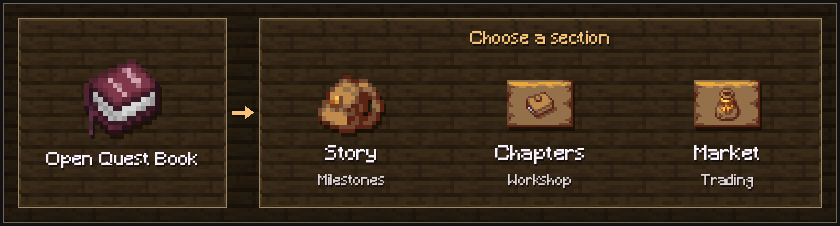
- The Story
- Start here and check off your chapter milestones.
- Forging Ahead
- Follow the workshop quests and their prerequisites. Open the chapter questlines.
- Market
- Claim a free Trading Hub to list a shop. Set up a player shop.

Look up recipes and build your first workshop
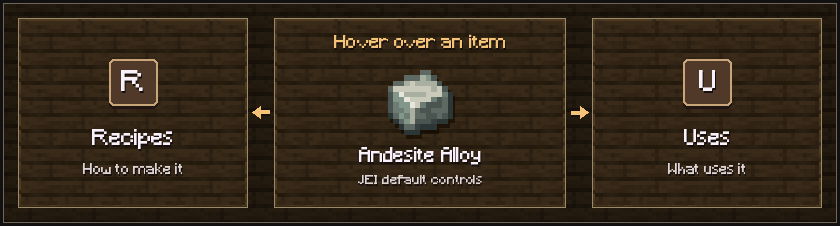
Search for an item in JEI and hover over it. With the default bindings, press R to see how to make it or U to see what it goes into. You can change Show Recipes and Show Uses under Just Enough Items in Key Binds.
- Start with Chapter I. Use a crafting table to make a Makeshift Mechanism with four Andesite Alloy, four wooden slabs and one Iron Ingot.
- Build your first Andesite Machine in Chapter II. Follow Welcome to the Machine! and surround one Andesite Casing with eight Makeshift Mechanisms in a crafting table.
- Work backward from the output. Open each ingredient’s recipe, and check the process and machine before gathering parts. For sequenced assembly, follow the operations and loop count in order.
- See the equipment in action. Hover over a Create item and hold its Ponder key for the in-game demonstration. Follow the handbook’s build guides for complete setups or open the recipe reference.
Mine a batch with Ultimine. Hold the bound FTB Ultimine key while mining. Check the highlighted blocks first, then break the target to harvest a batch. The pack caps each batch at 64 eligible blocks, and using Ultimine drains hunger.
Start with a cobblestone generator, tree farm, or Sapper. If a machine stops turning, see the Create troubleshooting guide.

Build your character
Open the Character screen from your inventory or press I by default. Look for Open Character in Key Binds to change the shortcut. The screen brings together your level, Origin and skills.
- Gain character experience. Fighting, gathering, exploring and quest rewards all support character progression. Read a quest’s reward list before counting on it for experience.
- Choose an Origin. Read each Origin’s starting bonuses before you confirm your choice. The Origins reference shows the full options.
- Spend skill points. Start at a root and follow connected nodes. You can build across the six professions. Some advanced skills require a minimum point investment before you can buy them.
Try a route in the skilltree planner and check titles for other challenges and benefits.

Fight with Epic Fight
Open the Epic Fight tutorial for attacks, skills, dodging and parrying.

Open loot and identify equipment
- Check your own loot. Lootr containers give each player their own drops. Everyone in a party should open the Lootr container themselves.
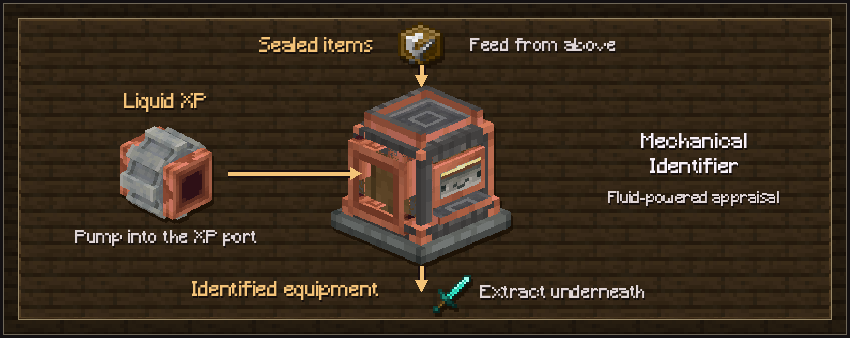
- Appraise unidentified gear. Bring unidentified equipment to the Identifier and check the experience cost. Later, use the Mechanical Identifier and supported XP fluid for automation.
- Compare the result. Check the item’s stats, rarity and affixes against your build. Salvaging unwanted gear costs vanilla XP and earns credit toward a later identification.

Claim a base and make a return route
- Open the Claim Manager. Select FTB Chunks: Claim Manager in the inventory’s FTB sidebar. Left-click a chunk to claim it or right-click one of your claims to unclaim it.
- Check team access. If you build with friends, check your team and its access settings before sharing machines or storage. The pack excludes the End and Twilight Forest from land claims and disables force-loading.
- Activate useful Waystones. Interact with a Waystone to add it as a destination. Visit another Waystone to return to a saved stop. The pack disables the XP cost by default.
The shared worlds guide covers teams, claims and server travel.

Go exploring and learn magic
Take on adventure quests alongside workshop progression. Pack dimensions use their own entry rules. Check Boss Encounters for summoning conditions and which bosses drop the eyes you need for the End.
Build a portal to the Aether or Twilight Forest, or activate the Ancient City gateway to the Otherside.
- Ars Nouveau covers your first glyphs, spell and crop-fed Source setup.
- Iron’s Spells ’n Spellbooks shows how to equip a scroll, cast it and use the Scroll Forge.