

 Build guides

Cobblestone generator
Build a renewable source of cobblestone for your workshop. Mine it by hand first, then automate it with a Mechanical Drill and a Create Chute.

What you need
Set it up
Make a trench with a drop
Build a one-block-wide channel with four spaces in a row. From left to right, leave room for the water source, the water drop, the mining space and the lava source. Lower the floor under the second space by one block. Contain the sides and ends with blocks like stone.
Add the water, then the lava
Pour water into the first space and check that it falls into the drop. Pour lava into the fourth space. It will flow toward the falling water and form cobblestone in the third space. Mine that block with a pickaxe. A fresh one forms in the same spot.
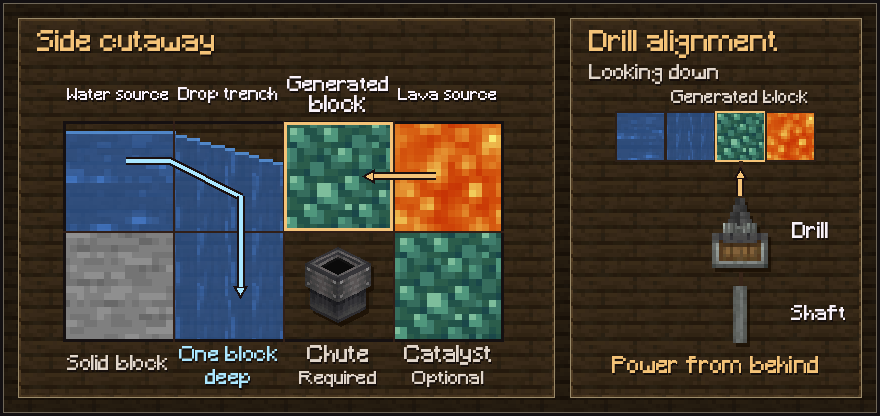
Keep the chute beneath the generated block in the powered build. The diagram shows an optional Veridium catalyst. Use an ordinary floor block for cobblestone or Andesite for andesite. Automate with a drill and chute
In Chapter II, place a regular Create Chute directly below the mining space and a chest below the chute. Aim a Mechanical Drill at the mining space from the side of the channel and connect it to rotational power. The first cobblestone block forms normally. Create’s optimized drill keeps that block in place and sends the output straight into the chute. This avoids loose item entities and repeated block-breaking and fluid updates.
Generate Andesite
Keep the Create Chute directly beneath the mining space. Replace the floor block below the lava source with Andesite, then restore the lava source above it. The generator now makes Andesite in the mining space. The catalyst stays in place.
Troubleshooting
- Is the drill dropping loose items?
- Stop the drill and check that the chute sits directly under the block it faces. Match the water and lava positions in the diagram and make space in the chest before restarting.
- Did the lava become obsidian?
- Check that the water is falling into the drop and that the lava source is separated from it by the mining space. Restore the lava source once the channel is clear.
- Still getting cobblestone after the upgrade?
- Check that the chute is directly below the generated block and the Andesite is directly below the lava source. The lava source must be beside the generated block at the same height. If the new material keeps breaking and reforming after a catalyst swap, wait for it to form and re-place the drill.