

 Build guides

Build a walking machine
Build a four-legged Let It Walk test rig with Chapter VI Light Engineering parts, then power, pose and pilot it.

What you need
Set it up
Build a small hull and four matching legs
Place the Walker Core in the hull and the Pilot Controls directly behind it. Hang a Leg Hinge or Leg Swivel under each corner, facing the next segment. Extend each leg with blocks and finish it with a Leg Foot. Keep the four feet level and leave room for the legs to move.
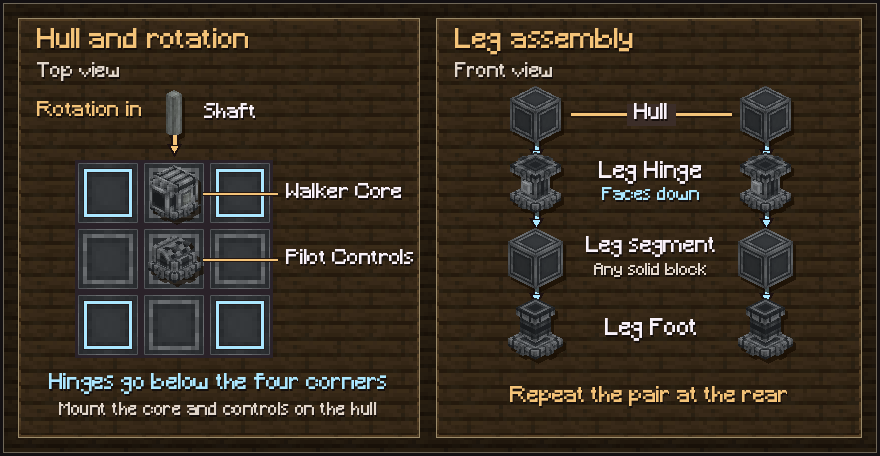
Power the front, then assemble
Connect a turning shaft to the front of the Walker Core. Right-click the core with an empty hand to assemble the walker. Confirm that it detects all four legs before trying to drive. Right-click an assembled core to park it.
Adjust the resting pose
Hold the Positioner and look at a hinge or swivel. Scroll to change its rest angle by 5 degrees per notch. Hold Ctrl while scrolling to adjust by 1 degree. Set matching angles on the left and right before testing.
Drive on flat ground first
Right-click the Pilot Controls. Use W and S to drive, A and D to turn, and the mouse wheel to shift gears. Shift exits the controls. The pinned version allows the first two gears at 16 RPM, the third at 32, the fourth at 64, and the fifth at 128.
Troubleshooting
- The walker stands but won’t move
- Check that the shaft feeds the front face, the network has spare stress capacity, and the core is unparked. A joint set to Arm will keep a pose but won’t take steps.
- Jet Feet won’t lift the hull
- Fit Jet Feet on at least half the legs. Supply lava with a pipe or a lava tank against the back of the core. Check the flight key in Let It Walk’s controls.