

 Build guides

Assemble and lift your first airship
Make a small Aeronautics test platform in Chapter VI. Check glue, lift and propulsion before building a full ship.

What you need
Set it up
Glue the parts you want to move
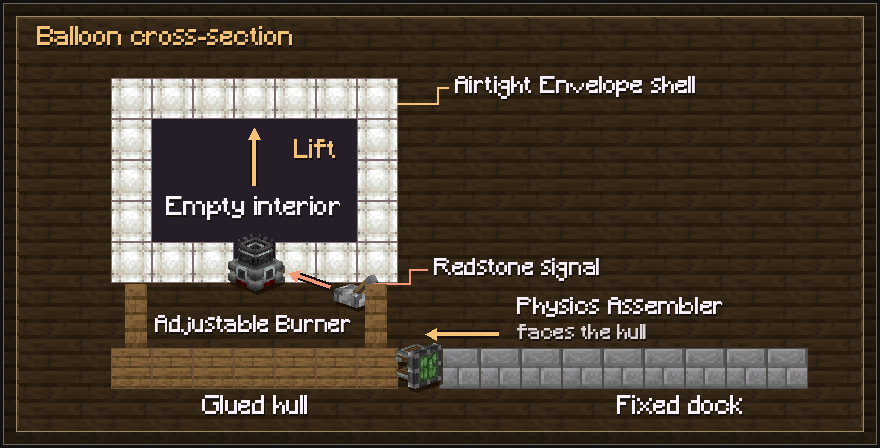
Join the hull, burner and balloon to the blocks in front of the Physics Assembler. Avoid including the dock or scaffolding in the glue area. Hold right-click and pull the Assembler’s on-screen lever to assemble the contraption.
Fill a sealed balloon above the burner
Build an airtight Envelope shell with empty space inside and the Adjustable Burner open to that space from below. Give the burner a redstone signal. It fills the balloon from the top down. Set its maximum output on the burner and use the input signal to vary it.
Add thrust after the lift test
Attach a powered Propeller Bearing and a propeller with at least two valid sail blocks. Use Engineer’s Goggles to inspect thrust. Test low over a clear landing area. Reverse its rotation or use a Wrench to change thrust direction if it moves backward.
Bring it down before disassembly
Lower the burner output and let the hull settle near the ground. Stop its motion before disassembling. A fast or poorly aligned contraption can fail the disassembly check.
Troubleshooting
- The burner is running but it won’t lift
- Inspect the shell for leaks and keep the balloon interior open. More balloon volume can hold more hot air. Reduce the weight of the hull if the balloon is full and still cannot lift it. Lift and propeller thrust weaken with altitude.
- Parts stay behind or fall off
- Inspect the glue boundaries with the glue item. Make sure every part is connected to the hull and that the Assembler faces the glued structure. Test a small section before attaching the entire ship.