

 Build guides

Sophisticated Storage
Upgrade a chest or barrel in place, make more room for bulk materials and control what your factory puts in or takes out.

What you need
Set it up
Upgrade the container where it stands
Craft a Basic Tier Upgrade with a Lever surrounded by four Sticks in a cross. Close the container, hold the upgrade and right-click a placed vanilla chest or barrel. It keeps its contents and gains one upgrade slot. A double chest uses two tier upgrades.
Make bulk materials fit
Craft a Stack Upgrade Tier 1 with eight logs around an Upgrade Base, then put it in the container's upgrade slot. A cobblestone stack can now hold 128 items per slot. Shift-click to take one normal stack. Ctrl + Shift + left-click takes as much from that slot as your inventory can hold.
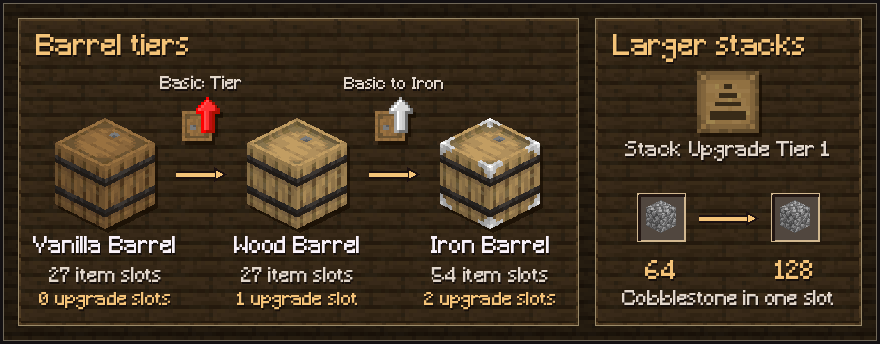
Tier upgrades add container slots. A Stack Upgrade lets each slot hold more of the same item. Filter a hopper or pipe
Use a Basic to Iron Tier Upgrade on the placed container to get a second upgrade slot for the Filter Upgrade. In its filter tab, choose Input and set it to allow a sample item such as Cobblestone. Test the filter with one Cobblestone and one item that should be rejected. Choose Output if you need to filter what a hopper or pipe pulls out.
Build a shared drop-off point in Chapter V
Craft a Storage Controller with a Calculation Machine and place it against a bank of Sophisticated Storage containers. Right-click the controller with a stack that already has a match in the bank to deposit it. Open the relevant container to take items by hand, or connect a hopper or pipe to a Storage Output for automated extraction.
Troubleshooting
- Check the tier and upgrade slots
- Wood and Copper chests and barrels have one upgrade slot. Iron has two. If a tier upgrade does not apply, check that it starts from the container's current tier and that the container is closed.
- Clear oversized stacks before removing an upgrade
- Take out or split oversized stacks before removing a Stack Upgrade. The remaining items need to fit within the lower slot limit.
- Pack a container before you move it
- Right-click a filled Sophisticated Storage chest or barrel with Packing Tape. Once it is visibly packed, break it and place it again to move its contents with it.