

 Build guides

Build a Create Nuclear reactor
Build and start the smallest Create Nuclear reactor. Use a layer plan, connect coolant and rods, and bring the generated rotation into your workshop.

What you need
Set it up
Prepare the reactor components
Make the shell, ports and rods with the Industrial-tier recipes. The Reactor Core and Reactor Controller use the later Chapter IX recipes. Check JEI for this pack's Mechanical Crafter patterns. The Reactor Output supplies Create rotation and the Alex’s Caves Nuclear Furnace is a separate machine.
Build the 5 × 5 shell seven blocks high
Lay solid Casing on floors 1 and 7. On floors 2 through 6, put a Core in the center, surround it with eight Coolers and put a Frame at the middle of each wall. Fill the remaining wall cells with Casing. On floor 4, replace the middle Frame on your chosen front wall with the Reactor Controller, facing out.
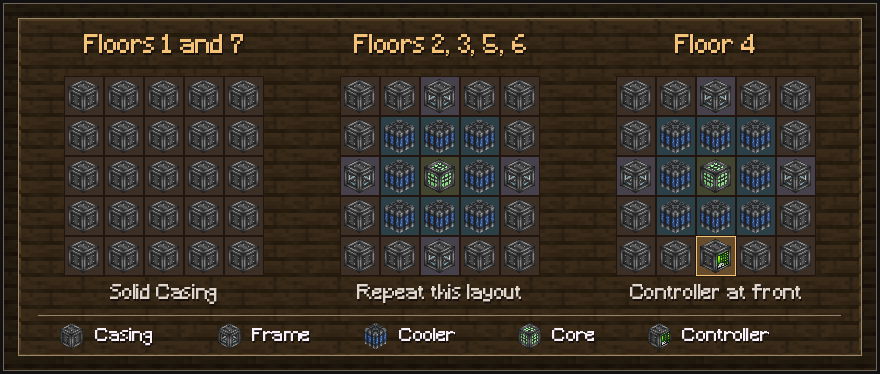
Tier 1 layout from Create Nuclear’s Ponder. The bottom edge of each grid is the front. Install the ports in place of non-edge exterior Casing. Add two rod inputs, coolant and rotation output
Replace four non-edge exterior Casing blocks with two Reactor Rod Inputs, one Reactor Fluid Input and one Reactor Output. The inside squares of the roof are easy to reach. Feed Uranium Rods and Graphite Rods through separate inputs, pump water into the fluid input and connect a Shaft to the output.
Load a balanced Blueprint and start
Right-click with the Reactor Blueprint to edit the rod layout. Start with a modest number of fuel positions and assign Graphite Rods for cooling. With coolant flowing and the required rods available, right-click the assembled Controller with the completed Blueprint. Check heat at the Controller and test the output under a light load before connecting more machinery.
Troubleshooting
- The Controller won’t assemble
- Check the five inner layers one at a time. The Controller replaces the center Frame on floor 4, and ports replace only exterior Casing away from edges. Hover a Reactor Controller in JEI and hold W for Reactor T1 and the I/O placement scene.
- The reactor assembles but gives no rotation
- Verify the Blueprint is installed, both kinds of rod are available and coolant reaches the Reactor Fluid Input. Check rotation directly off a Reactor Output before adding the rest of your network.
- Heat is climbing or the alarm sounds
- Check the coolant flow and Graphite supply immediately. Reduce fuel positions in the Blueprint before another run. Neighboring Uranium Rods increase heat. Anti Radiation armor is available through the pack’s Industrial-tier recipes.