

 Build guides

Build an Immersive Engineering Excavator
Find a mineral vein, assemble the engine and Bucket Wheel, then collect and sort the material it digs up.

What you need
Set it up
Follow the mineral readings
Hold use with Survey Tools on natural rock or soil. Move at least four blocks between readings and follow the direction and distance hints. F3+G can help you map your readings. Veins span areas and can overlap.
Sample the wheel's digging position
Power the Core Sample Drill with 40 FE/t and right-click to start. After it finishes, right-click again to collect the Core Sample. Compare two or three nearby readings and pick a spot with the mineral mix and saturation you want. Plan for the bottom of the Bucket Wheel to sit above that spot.
Build the engine and Bucket Wheel by layer
Check the engine and Bucket Wheel separately in the Engineer's Manual and build from the bottom up. The wheel fits between the engine braces. Place one custom Heavy Engineering Machine in the engine's middle layer at the wheel-side end of its three-block Heavy Engineering row. Place the second one at the bottom of the wheel.
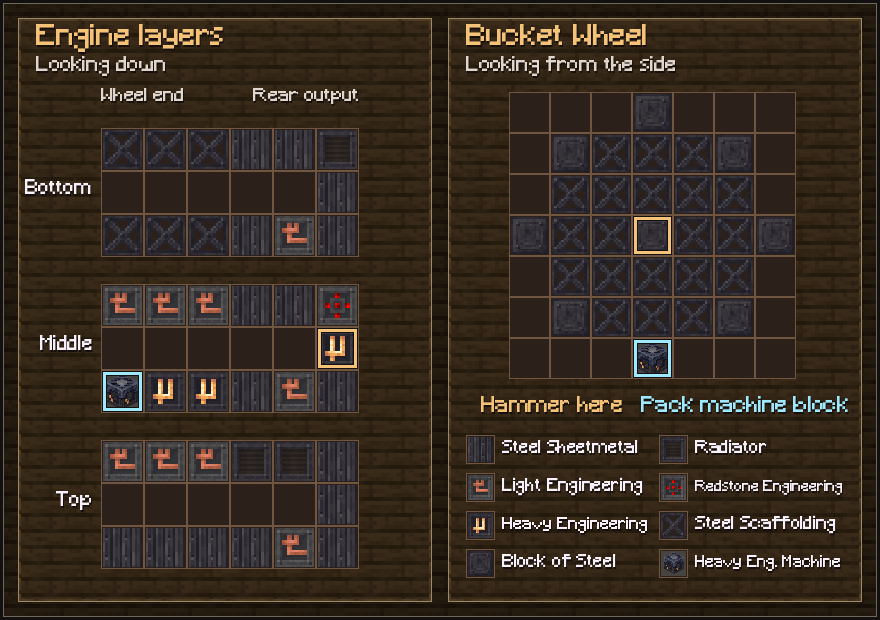
The engine and wheel use two custom machine blocks. Hammer the gold-marked blocks to form the structure. Form both parts with the hammer
Right-click the engine's rear-center Heavy Engineering Block with the Engineer's Hammer. A correctly aligned Bucket Wheel forms with the engine. To form the wheel separately, hammer the Block of Steel at the center of the wheel.
Power the engine and sort its output
Connect a sustained 4,096 FE/t supply to the engine's side power connections. Catch material at the rear output with storage or route it onto a conveyor. Use the deposit list to plan separate output paths for metal-bearing stone, ores and spoils.
Troubleshooting
- The structure will not form
- Check both custom machine positions, the wheel alignment and which block you are hammering. Match the Standard variant of Steel Scaffolding in the previews.
- The wheel will not turn
- Confirm the wheel is formed, the power connection can sustain 4,096 FE/t at the engine, and the rear redstone control allows the machine to run.
- The wheel brings up mostly stone
- Sample directly under the bottom of the wheel. Low saturation and distance from the vein center increase spoils, and deposits deplete with use. For example, survey for Copper Schist if you want Veridium and Copper Ore, or a Certus Quartz Pocket if you are feeding an AE2 line.