

 Build guides

Set up and troubleshoot an AE2 network
Build a basic ME system in Chapter V, then diagnose offline devices, missing channels and stuck autocrafting.

What you need
Set it up
Build the smallest working network
Feed FE into an Energy Acceptor. Connect the ME Drive and the cable that holds your ME Terminal to that same network. Insert an item storage cell into the drive. Open the terminal, deposit one item, then take it back out.
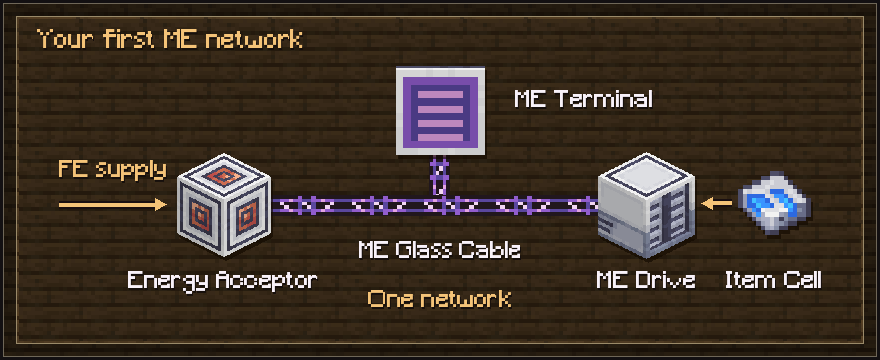
Count channels before expanding
With no controller, the whole network supports eight channel-using devices. A drive and a terminal use one each. For a larger network, add an ME Controller. Use dense cables for the trunk, up to 32 channels, and standard cables for branches, up to eight. Leave room for each new device.
Trace the cable path that is actually used
Replace a piece of cable near an offline device with the matching ME Smart Cable. Check channel usage toward the ME Controller. Channels generally route by the shortest suitable path. Remove loops and use cable anchors or differently colored cables to keep branches separate. Colored cables affect connections.
Test autocrafting with a one-item pattern
Add a Crafting CPU with Crafting Storage. For a regular crafting pattern, give an ME Pattern Provider a Molecular Assembler and put the pattern in the provider. For a Processing Pattern, point the provider at the machine’s input. Route its finished output back into the ME network. Request a single craft first.
Troubleshooting
- The terminal shows Device Offline
- Verify the FE supply first, especially after adding machines. Check the terminal is attached to the powered cable, then check that the drive and terminal each have a channel. Test them on a short isolated network if the main route is hard to follow.
- The terminal refuses an item
- Open the drive and inspect both stored types and used bytes. An item cell can hit its type limit while it still has room for items of types it already stores. Check any cell partitions and storage bus filters too.
- The processing job sits on a missing output
- Check that the production machine received the requested ingredients and that the output returns to the same ME network. Use an Import Bus at the correct output or send the product into an ME Interface. Match the actual output and quantity in the encoded pattern.